 Sunreach
Polariser guide: where the sky is bluest
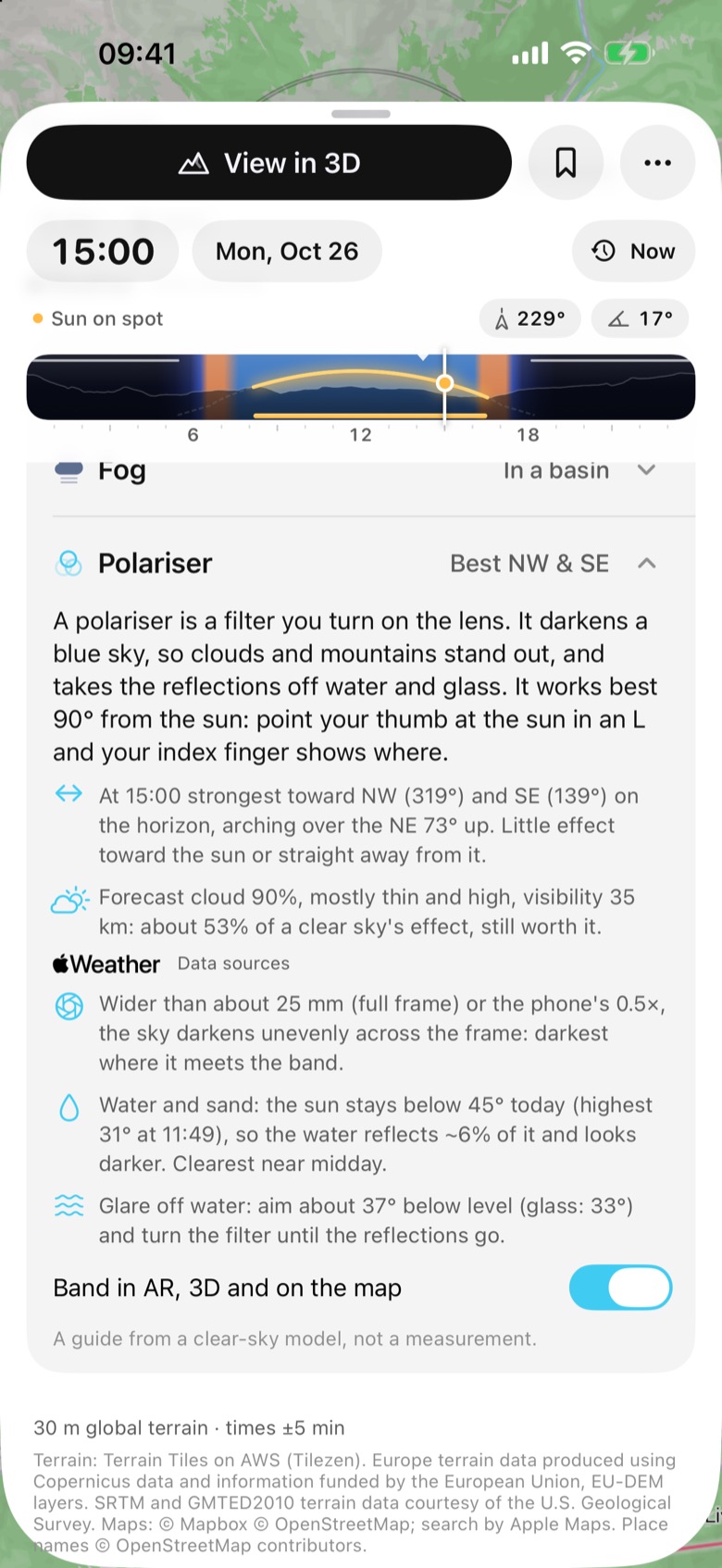
A polariser darkens a blue sky and takes the reflections off water and glass, but only in the right direction. Sunreach shows that direction for any spot and minute, says whether the forecast leaves enough of the effect to bother, and draws the band over your camera view.
Part of Sunreach Pro: the plan row, the band in AR and 3D and the map rays. The row stays visible with a Pro badge.
Sunreach is coming soon to iPhone and iPad; screenshots are from the iOS Simulator, 26–27 October 2026.
What it does
Polariser is a row in the plan, under peak light and fog. Its header names the best directions for the minute you picked, for example Best NW & SE. Open, it explains in two lines what the filter does, then gives the strongest bearings on the horizon and how high the band arches, the share of a clear sky’s effect the forecast leaves, which lenses show an uneven sky, when the sun is high enough for clear water and white sand, and the angle to aim at water or glass to cut the glare.
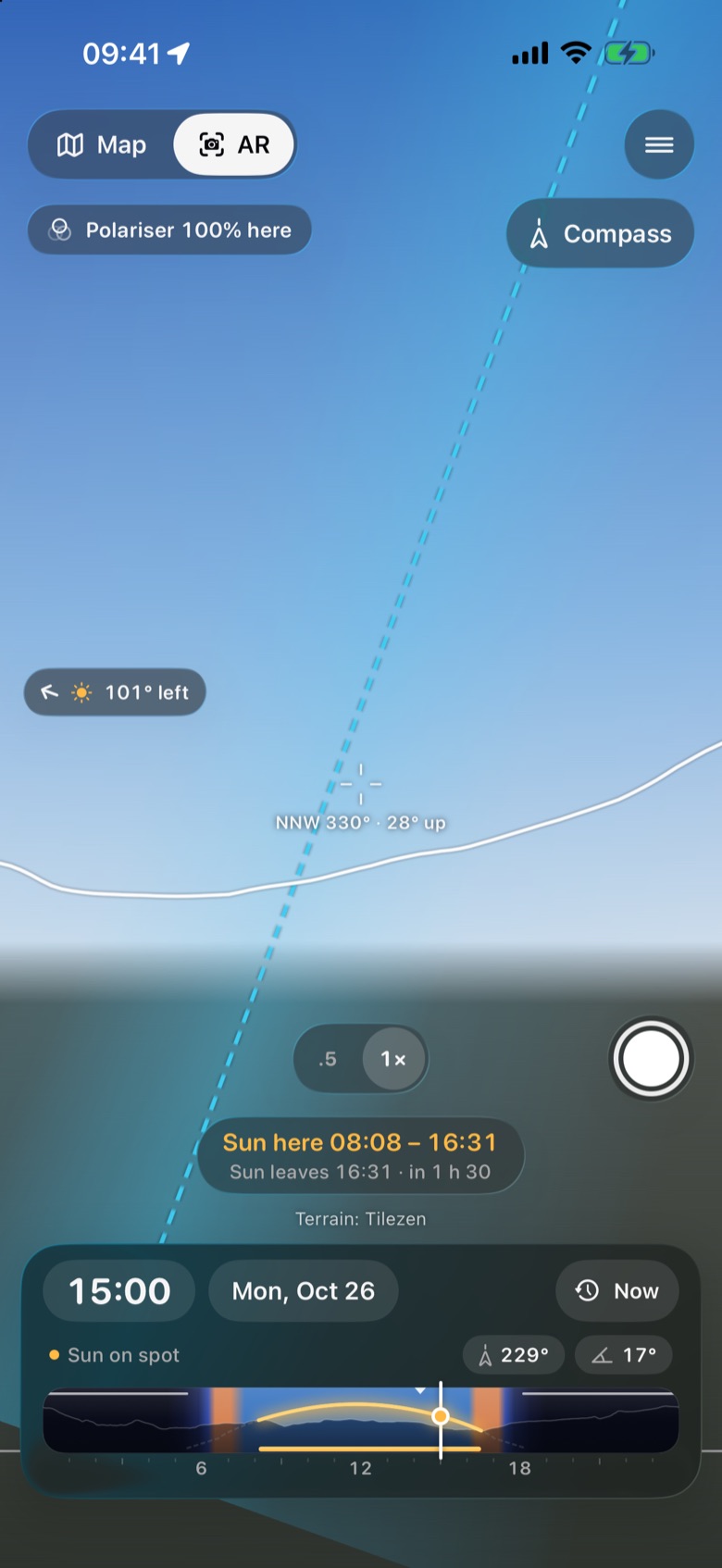
The switch Band in AR, 3D and on the map (also under Settings) draws the band of strongest effect in AR, with a readout such as Polariser 100% here for where you point and a warning when the frame is so wide that the sky will darken unevenly. In 3D the sky darkens the way it would through a polariser turned for the most effect, and on the map two dashed rays join the sun ring.
How it works
Sunlight scattered by the air is partly polarised, most strongly 90° from the sun (Rayleigh scattering): the rule of thumb is to point your thumb at the sun in an L, and your index finger shows the bluest sky. The app works out that circle for the minute you pick. On the horizon it always sits at the sun’s bearing plus or minus 90°; its highest point is opposite the sun at 90° minus the sun’s height, so a low sun puts it overhead and a high sun keeps it low all round.
The forecast line reads the Apple Weather cloud cover by height and the visibility for that hour. Low cloud counts in full, thin high cloud much less. The water window is the time the sun is at least 45° up and on the spot, when water reflects only about 2–3% of it, so it shows the bottom and white sand stays white. The glare angles come from Brewster’s law: about 37° below level for water and 33° for glass.
How to use it
- Open a spot and scroll the plan to Polariser, below Peak light and Fog.
- Drag the clock along the day: the best directions and the band move with the sun.
- Read the forecast line: strong, still worth it, or it won’t help much.
- Turn on Band in AR, 3D and on the map, then open AR where you stand and turn until the readout is near 100%, or look round at eye level in 3D to see the darker sky.
In the app
Tips
- For the deepest blue, shoot with a low sun: at sunrise and sunset the band runs through the zenith from one side of the sky to the other.
- With a lens wider than about 25 mm (full frame) or the phone’s 0.5×, keep the band away from the frame’s edge or expect a dark patch in the sky.
- For clear water and white sand, plan for the water window. In the tropics it is the hours around midday; in the Alps in winter the sun never gets that high.
Good to know
- It is a clear-sky model, not a measurement: real skies are less polarised, haze and cloud vary, and the cloud weights are a first estimate.
- The forecast line needs the Apple Weather forecast and a network. The band has not yet been checked against a real filter on a device.